How many unread PDF documents are sitting in your downloads folder right now? University textbooks, programming manuals, research papers, industry whitepapers, or classic essays that you fully intended to finish, but keep postponing because staring at a screen for hours causes serious digital eye strain.
Modern daily life leaves little room for sitting still in front of a heavy document. At the same time, we spend hours commuting, working out, walking the dog, or cooking dinner—moments where our hands and eyes are occupied, but our minds are completely receptive.
This makes turning a PDF into an audiobook one of the highest-leverage productivity habits you can build. However, if you have ever tried your operating system’s built-in text-to-speech or a standard PDF reader’s voice toggle, you know the frustration: robotic, monotone voices that read out page numbers, fragmented footnotes, and broken URLs.
Here is an in-depth breakdown of how PDF-to-audio conversion works, why conventional methods fall short, and how to create a fluid, natural listening experience.
1. Why Traditional PDF-to-Audio Solutions Fall Short
When people attempt to listen to their PDFs, they typically resort to one of three approaches, each with critical shortcomings:
A. Primitive Built-In System Text-to-Speech (TTS)
Standard operating systems (Windows Narrator, macOS basic speech, standard PDF viewers) offer basic accessibility reading.
- The flaw: They use outdated synthesis engines with zero contextual intonation. They cannot modulate pitch for questions or emphasis, and they mechanically recite header lines, page numbers, and bibliography references, quickly derailing your comprehension.
B. Static PDF-to-MP3 File Converters
Web converters and batch utilities that dump the entire text of a PDF into a single large .mp3 file.
- The flaw: A continuous 4-hour audio file is completely rigid. If you zone out for thirty seconds, rewinding and pinpointing the exact sentence you missed is nearly impossible. Moreover, when documents contain tables, math equations, or code snippets, static converters churn out gibberish.
C. Commercial Audiobook Catalogs (Audible, Storytel)
These platforms feature pristine, human-narrated recordings by professional voice actors.
- The flaw: They only license commercial bestsellers and mass-market fiction. If you need to study a graduate-level neuroscience textbook, an engineering specification, or an internal research whitepaper, it simply does not exist on commercial platforms.
2. What to Look for in a Modern PDF-to-Audiobook Tool
To transform a PDF into a high-retention audio study session, an optimal solution must deliver five essential capabilities:
- Neural Speech Synthesis: Modern AI models trained on human cadence that understand breath pauses, clause boundaries, and natural vocal inflections.
- Paragraph-Level Structural Segmentation: An intelligent layout parser that strips out repeating headers, footers, and page numbers, isolating the main prose without audio interruptions.
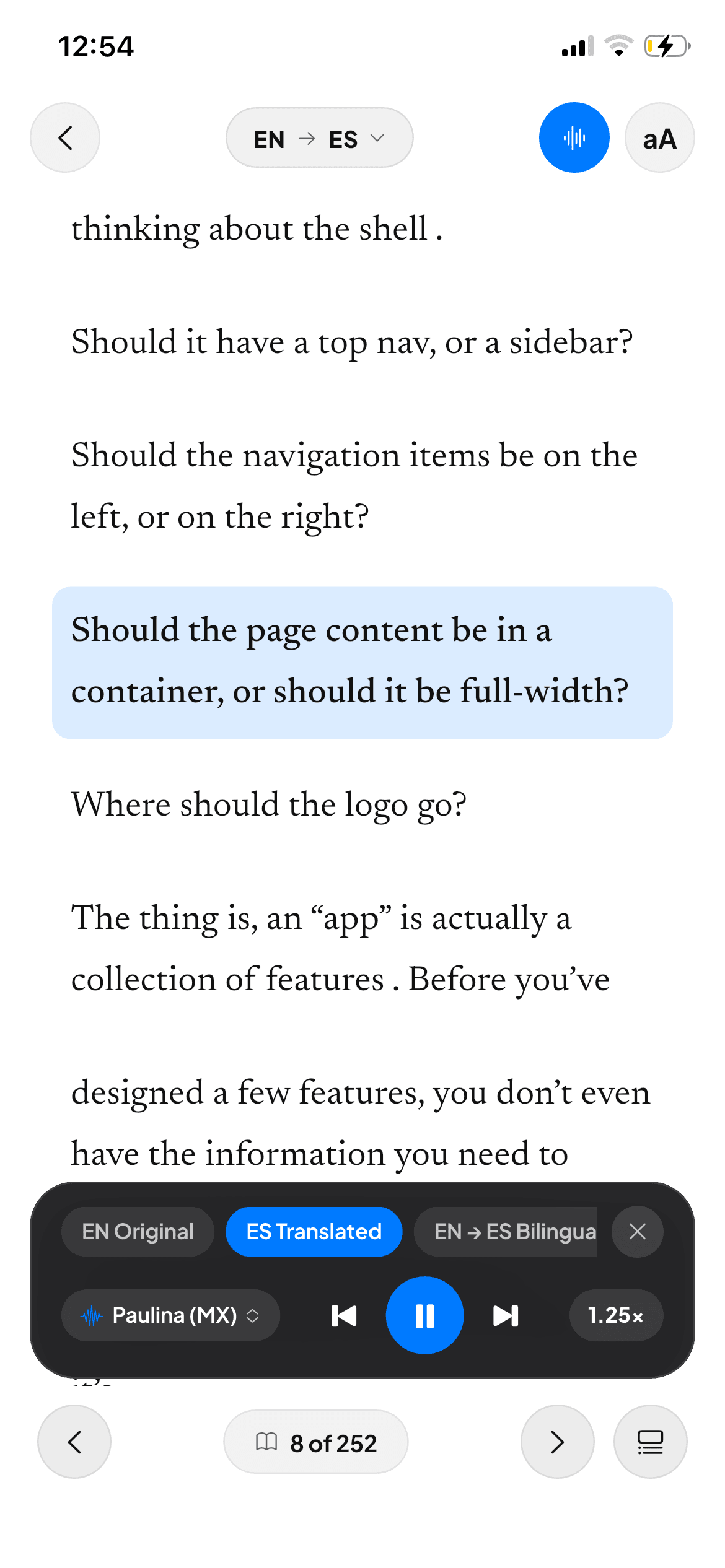
- Synchronized Visual Tracking (Dual-Coding): Being able to listen while viewing highlighted sentences or paragraphs. Cognitive science shows that simultaneous visual and auditory input dramatically enhances comprehension and memory retention.
- Flexible Speed Control: Variable playback rates from 0.75x (for absorbing complex academic arguments or foreign language practice) to 1.0x (standard conversational speed) and 1.25x–1.5x (for fast reviews).
- Alternating Bilingual Audio: For readers using English PDFs to improve their language proficiency, hearing the original paragraph followed by a contextual translation creates an unmatched educational loop.
3. Step-by-Step: How to Efficiently Convert Your PDFs to Audio
Follow this practical workflow to start listening to your library today:
Step 1: Verify the Text Layer (OCR)
PDFs come in two varieties: digital vector text or scanned image pages. If you cannot select words with your mouse or finger, your document is an image scan. Before generating audio, apply Optical Character Recognition (OCR). High-end reading applications perform this step automatically upon import.
Step 2: Choose Passive vs. Active Listening
- Passive Listening: Ideal for lighter non-fiction or narrative summaries while jogging or driving, where continuous chapter playback is sufficient.
- Active Listening: Crucial for technical, STEM, and academic texts. You need the ability to pause instantly with a single tap, replay difficult paragraphs, look up specialized terminology, and test your own understanding.
Step 3: Structure Focused Listening Blocks
Avoid trying to power through 60 pages of technical material in one go. Keep your listening sessions between 20 and 30 minutes. Research shows that listening retention drops significantly after 40 minutes of uninterrupted dense audio.
4. Turn PDFs into Interactive Audiobooks with Readara
Readara was engineered specifically to solve the friction points of conventional document readers and generic audiobook apps:
- Direct PDF Import: Open any textbook, research paper, or manual directly on your iPhone or iPad without manual conversions or complex formatting tweaks.
- Paragraph-by-Paragraph Studio Voices: Instead of a reckless robotic stream, Readara treats every paragraph as a distinct audio unit powered by natural neural voice synthesis.
- Continuous & Bilingual Audiobook Modes: Set your reading speed (0.75x, 1.0x, 1.25x) and enable continuous playback for your commute, or switch on alternating bilingual mode to master English in context.
- Integrated 4-Mode Interactive Tutor: Tap any paragraph to pause audio, access pedagogical definitions, or activate the “Speak” mode to pronounce sentences into your microphone and receive instant AI feedback (0–100% accuracy score).
- Preserves Diagrams and Equations: An editorial layout engine maintains all illustrations, charts, and mathematical notation cleanly formatted in an Apple Books–inspired interface.
Conclusion
Converting your PDF library into audiobooks is no longer a clumsy compromise between 90s robotic voices and unnavigable MP3 files. With neural speech synthesis and interactive reading tools, any textbook or paper in your collection can become an engaging, high-retention audio learning experience wherever you go.
Frequently Asked Questions (FAQ) & Related Guides
How do I turn a PDF into a natural-sounding audiobook without robotic voices?
Import your PDF into Readara on iPhone or iPad. Unlike legacy screen readers that read page headers and footnotes robotically, Readara segments pages into clean paragraphs and narrates them with lifelike neural voices—powering the bimodal reading method for dense PDFs.
Can I turn a two-column academic paper or STEM textbook into an audiobook?
Yes. Readara preserves all tables, figures, and equations while narrating each column in logical order, helping you master technical books and STEM PDFs or read scientific papers 2x faster.
Does listening to PDFs as audiobooks help with ADHD or foreign languages?
Absolutely. Neural audio pacing is the #1 strategy in our ADHD guide to reading dense technical PDFs, and bilingual audio mode pairs seamlessly with fast format-preserving PDF translation.